Free Website SEO & Speed Audit Tool
Score any website across SEO, Core Web Vitals speed, technical security, accessibility, UX, and AI search readiness. Enter your URL to get an instant, actionable audit report in seconds.
How SiteAuditScan Works
From URL input to actionable PDF audit report in three effortless steps.
Enter Any Website URL
Type or paste your domain or target URL into the scanner. No credit cards, software downloads, or DNS configuration required.
Automated Real-Time Crawl
Our headless browser engine renders the actual page DOM, simulates mobile viewports, measures Core Web Vitals, and inspects 12 core categories in ~15 seconds.
Review & Export Free PDF
Get an overall 0–100 score, prioritized critical errors with code recommendations, and download a presentation-ready PDF report for clients or developers.
Sample Audit Report Overview
Here is an actual preview of the comprehensive audit report generated by SiteAuditScan.
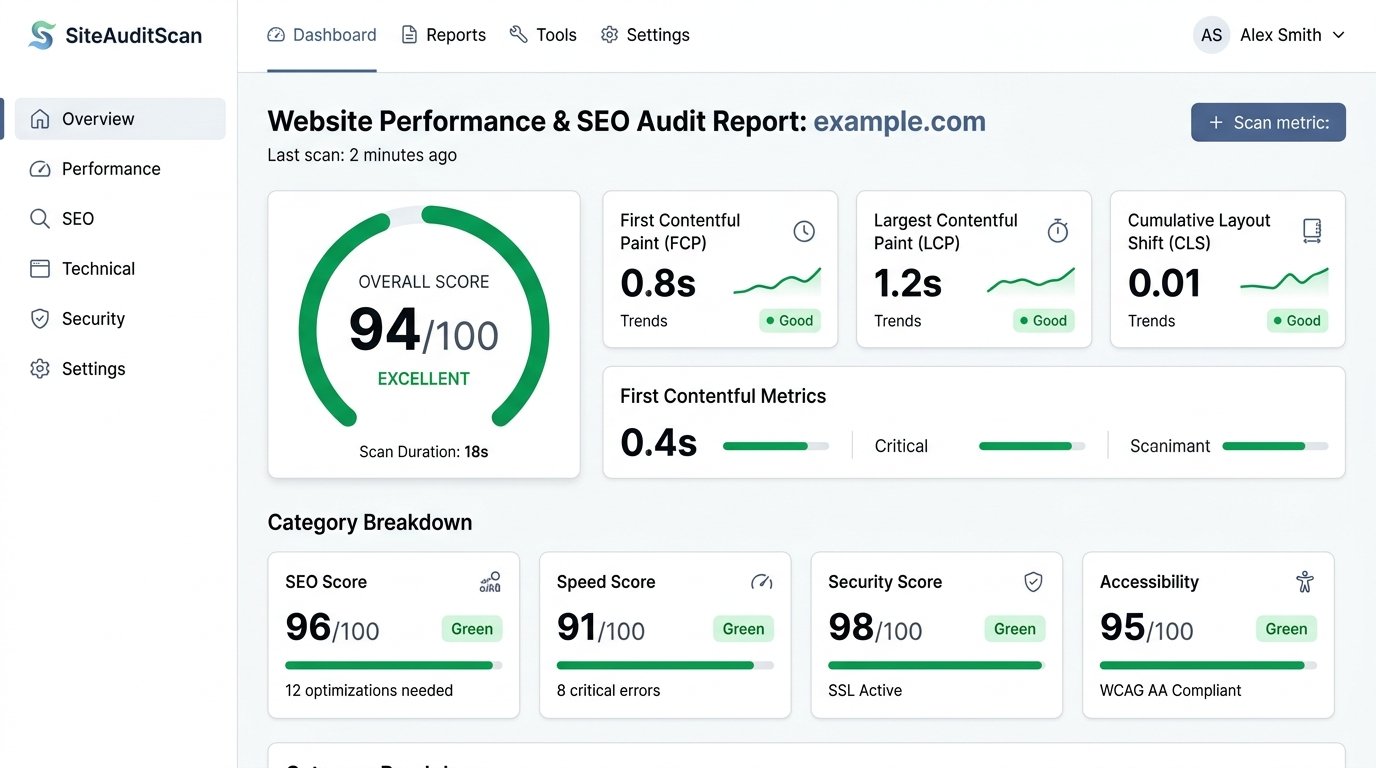
12 Core Categories Evaluated in Basic Scan
Analyze your website across essential SEO, technical performance, security, accessibility, content, and UX signals.
SEO Audit
Title tags, meta descriptions, canonicals, schema markup & sitemap checks.
Accessibility & ARIA
Alt tags, button labels, focus indicators, and screen reader standards.
Technical Security
SSL encryption, sensitive file exposure, mixed content, and console errors.
AEO (Answer Engines)
FAQ schemas, question headers, and voice search optimization.
GEO (Generative AI)
Author entities, llms.txt standard files, and AI crawler clarity.
Speed & Vitals
FCP, LCP, TBT, CLS, Speed Index, WebP image formats, and assets.
Design & UX
Above-the-fold CTAs, tap target sizing, font counts, and mobile overflow.
Local Business & NAP
LocalBusiness schema, click-to-call buttons, and Google Maps links.
Analytics & Tracking
GA4 scripts, Google Tag Manager, Search Console, and Consent Mode V2.
Content Quality
Placeholder copy detection, dummy contact info checks, and word counts.
Functional QA
Dead navigation links, search inputs, forms, and video element checks.
Cross-Browser
Responsive viewports across mobile (375px), tablet (768px), and desktop.
Latest Guides & Technical Articles
Practical walkthroughs from our engineering team to help you diagnose and fix common website issues.
I Compressed My Images, but My Website Is Still Slow — What Else Should I Check?
Compressing images is only step one. Learn how render-blocking JavaScript, slow server TTFB, unoptimized web fonts, and CSS bloat drag down your load speed.
Google Indexed My Homepage but Not My Other Pages — What Should I Check?
Find out why Google stops after crawling your homepage. Diagnose XML sitemap omissions, accidental noindex directives, orphan pages, and canonical tag mismatches.
My Website Looks Perfect on Desktop but Terrible on Mobile — What Went Wrong?
Discover why elements overflow off-screen on smartphones, font sizes shrink too small, and navigation menus fail. Practical responsive CSS fix guide.
I Found an Unexpected File on My Website — Should I Be Worried?
Learn how to identify whether an unfamiliar file in your public directory is a harmless CMS cache artifact, .env file leak, or malicious backdoor payload.
Frequently Asked Questions
Everything you need to know about our free website audit tool.
What does the Free Website SEO & Speed Audit check?
Our Basic Scan analyzes your website across 12 critical categories including SEO meta tags, Core Web Vitals (FCP, LCP, CLS), accessibility, technical security, mobile design & UX, local business signals, analytics setup, content quality, functional QA, cross-browser compatibility, and AI readiness (AEO & GEO).
What is the difference between Basic Scan and Deep Website Scan?
The Basic Scan checks 12 essential page-level categories. The Deep Website Scan performs an exhaustive technical probe across 20 specialized dimensions including live DNS resolution, SPF and DMARC email security, HTTP response analysis, security headers, technology stack detection, and AI citation readiness.
How long does a website scan take?
Most scans complete in under 15 seconds. Our system uses a headless browser engine to render your actual webpage, extract DOM and network data, and calculate scores in real time.
Is the website scan free?
Yes, you can scan any website for free and receive an overall score with complete audit findings, prioritized issue recommendations, and downloadable PDF reports.
What is the Device Testing feature?
Device Testing lets you preview how your website looks and behaves across multiple real screen sizes including mobile (375px), tablet (768px), and desktop from a live interactive dashboard.
Can I download the audit report?
Yes! You can export a clean, branded PDF report of your full audit results for free, ready to share with clients, management, or developers.
Need a High-Performance Website Built for Your Business?
Whether you need a brand-new website from scratch, a sleek redesign, or expert developers to fix all your speed and SEO issues — connect with our engineering team directly on WhatsApp.
How We Can Help You:
Custom Next.js, WordPress, or full-stack web applications tailored to your industry.
Solve FCP, LCP, CLS, render-blocking scripts, and server bottlenecks for lightning speeds.
Resolve technical, schema, and mobile issues identified in your audit reports.